Track and understand
Record income, expenses and transfers. Organise cash, bank accounts and cards. Choose categories, merchants and payment modes, check your calendar and explore spending reports.

Track spending offline, plan budgets and see paid and remaining bill amounts. No bank connection needed.
Android · Closed testing · For adults 18+Testing access may require approval. How to join the test
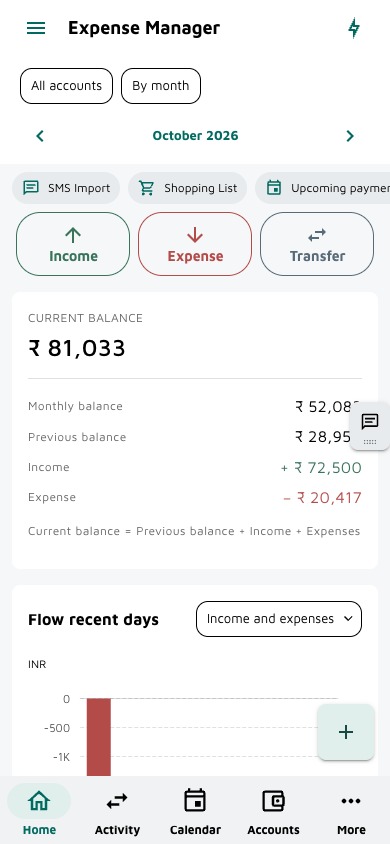
Record income, expenses and transfers. Organise cash, bank accounts and cards. Choose categories, merchants and payment modes, check your calendar and explore spending reports.
Plan recurring transactions, record advances and repayments, and track the remaining amounts for your debts.
Set budgets and goals. Export your records, back up to Google Drive, and protect the app with supported device biometrics. Choose when to lock or use Lock now.
From a quick check-in to the details behind your spending.
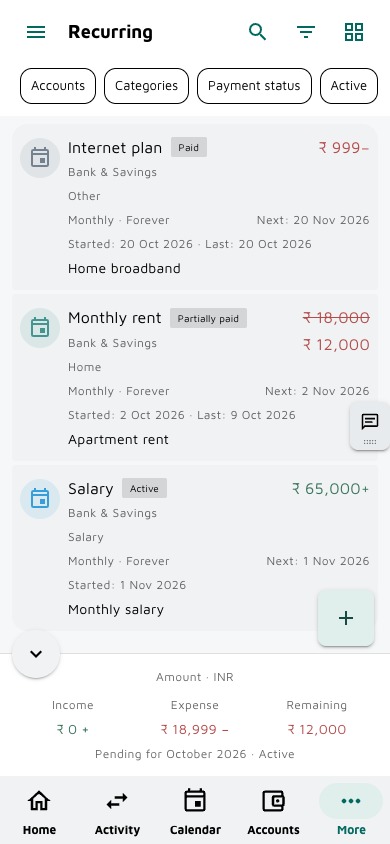
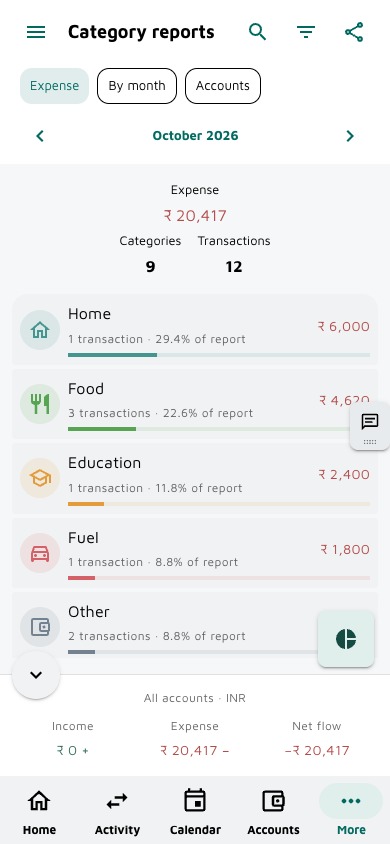
Pro preview · fictional sample data · light theme. Free limits and ads are explained below. Appearance may vary by installed version.
| What you get | Free | Pro |
|---|---|---|
| Accounts | 3 | Unlimited |
| Recurring schedules | 3 | Unlimited |
| Budgets | 3 | Unlimited |
| Goals | 3 | Unlimited |
| Merchants | 3 | Unlimited |
| Debts | 3 | Unlimited |
| Payment modes | Built-in modes | Built-in + custom modes |
| Transactions, Google Drive backup and biometric lock | Included | Included |
| Transaction chat and privacy mode | Included | Included |
| Reports and Planning | Included | Access anytime |
| Advertising | Banner ads | No in-app ads |
Monthly, yearly and one-time lifetime options are available in the app. Check local prices before purchase. Cancel subscription renewal through Google Play; Pro access continues until the paid period ends. Free supports up to three records in each limited section. Optional rewarded ads can temporarily unlock additional eligible records. Feature availability depends on your installed testing version.
Save merchant account and category defaults. Swipe rows for quick edit, delete, transactions or copy actions where supported.
Built-in methods are free. Pro lets you create custom modes with an icon, note and preferred order. Custom modes lock for transaction entry if Pro ends; your history stays.
Show, hide and reorder cards. Preview each card before adding it, and use privacy mode to hide displayed amounts.
Type or dictate one income or expense in English, then review and correct the prepared transaction before saving. Voice availability depends on your device’s speech service.
Join Google Play testing and help shape Simple Expense Manager around everyday use.
Use the Google account you use on your Android phone to open the tester page and opt in.
After joining, download or update the app from the Play Store.
Record a few expenses, try a recurring payment and send feedback from the app or email us.
Closed testing requires an approved account. Request tester access by email, then return to the opt-in page after approval. Access may vary by account and region.
Contact Farzpal Singh for help with Simple Expense Manager. Include your app version, device model and the steps that led to the issue.
farz.bhullar@gmail.comPlease avoid sending sensitive financial records or backup files unless needed to resolve your issue.
Yes, everyday transaction entry works offline. Backups, purchases, ads and some speech-recognition services require internet. You do not need to connect a bank account to record transactions.
Records stay on your device. Optional Google Drive backups use your private application-data folder. Your ledger is not sent to RevenueCat or AdMob.
Cancel subscription renewal through Google Play; access continues until the paid period ends. Uninstalling does not cancel a subscription. Use Restore purchases in the app with the same Google Play account to recover eligible access.
Delete local records or reset app data in the app. Delete cloud backups separately before disconnecting Drive. Deleting records or uninstalling does not delete exported backups or cancel subscriptions.